How to Use Claude Code to Patch and Migrate This Blog in Under an Hour
On October 21, 2026, the PHP project disclosed two critical vulnerabilities, CVE-2026-109618 and CVE-2026-109619, which the security community quickly nicknamed “PHP2Shell.” Both carry a CVSS score of 9.2. Together they can allow an unauthenticated attacker to run code on a web server, and they affect PHP all the way back to version 5.4. Like a lot of you, I read the advisories and started thinking about which systems I needed to check.
Then I checked the server that hosts this blog. It was running PHP 7.4 on Debian 9.
This one is a little different from my usual posts. It is part confession and part walkthrough. I write about network security for a living, so admitting that my own blog server was years out of date is humbling. That being said, I think the story is worth telling for two reasons. First, I suspect I am not the only one with a “forgotten” server. Second, I used Claude Code to do the heavy lifting, and the whole migration took less than an hour.
How My Blog Got Here
Back in 2021, I deployed this blog from the Google Cloud Marketplace using the one-click WordPress deployment. It worked, so I left it alone. I kept WordPress itself and the plugins updated (thanks autoupdate), but I never revisited the operating system or PHP underneath them. It was the classic “set it and forget it.”
I also leaned on the fact that the blog sits behind FortiAppSec Cloud (formerly FortiWeb Cloud), Fortinet’s SaaS web application firewall. The WAF absolutely provides value. However, I let it become a reason not to do the harder work. A WAF is a layer, not a patch. It can block a lot of malicious traffic, but it cannot fix vulnerable code running on the server behind it.
The last reason is that the upgrade looked painful. Getting from Debian 9 to a current release in place meant several major OS upgrades in a row, each with its own chance of breaking something. It always felt like a weekend project, and I kept postponing it.
Here is where the server actually stood:
| Component | Old Server | Status |
|---|---|---|
| Operating System | Debian 9 “Stretch” | End of life since 2022 |
| PHP | 7.4.28 | End of life since November 2022 |
| Database | MySQL 5.7 | End of life since October 2023 |
| Web Server | Apache 2.4.25 | No longer receiving updates on Debian 9 |
| Security Updates | None | Nothing applied in years |
The PHP2Shell fixes were released for PHP 8.2 and newer only. PHP 8.1 and earlier, including 7.4, will never get a patch. There was no “quick update” for this server. It had to be replaced.
Why I Handed This to Claude Code
I will be honest. I went into this as a skeptic. I have used AI assistants to help write and review content, and even did some experimentation in my home lab, but letting one work on live infrastructure that hosts my site is a different level of trust.
Claude Code is Anthropic’s agentic coding tool. It runs in a terminal, where it can run commands, read the output and decide what to do next, while asking for approval along the way. To give it access to my Google Cloud account, Claude Code installed the Google Cloud CLI, and then I signed in myself in my own browser. I never handed over a password. Claude Code simply used the session I authenticated.
My request was simple. I told it that I had an old Linux VM in Google Cloud running a vulnerable version of PHP, that it hosted my blog, and that I wanted a new, up-to-date VM with the blog migrated to it.
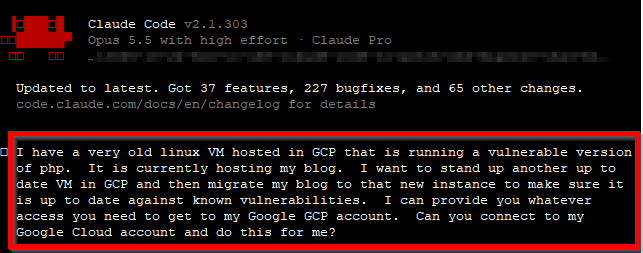
Figure 1. – Screenshot of my initial request in Claude Code
The Process
I was impressed by the speed. However, what really stood out was that Claude Code followed the same process I would expect from a careful engineer on a change window.
Step 1 – Look Before Touching
Before changing anything, Claude Code did a read-only inventory. It found the VM, checked the operating system, PHP, web server and database versions, reviewed the WordPress installation, and looked at the firewall rules and DNS. It even mapped my own architecture back to me: DNS points to FortiAppSec Cloud, which forwards traffic to a static IP on the VM. That detail turned out to matter a lot later.
It also ran some basic checks for signs of compromise. WordPress core and every plugin matched their official checksums, and there were no unexpected PHP files hiding in the uploads folder. That is not proof that the server was never touched, but it was reassuring.
Along the way, it flagged something I had completely forgotten about. An old SSL plugin had left a folder in the web root containing private keys from 2024. They were not downloadable, but they had no business being there.
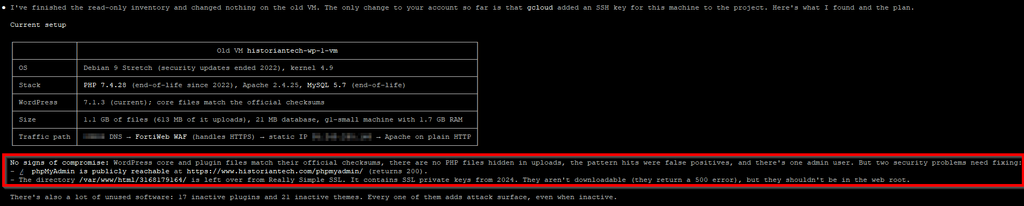
Figure 2. – Screenshot of the inventory Claude Code produced for the old server
Step 2 – A Plan, and Questions for Me
Next, Claude Code laid out a plan and asked me to make the decisions that were mine to make: what size VM to use, which unused items to leave behind, and whether it should cut over automatically or wait for my go-ahead. I chose to have it wait.
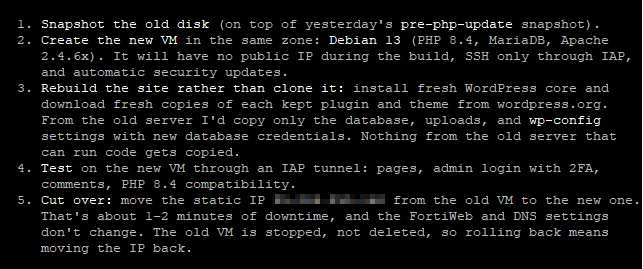
Figure 3. – Screenshot of the decisions Claude Code asked me to make before building anything
Step 3 – Back Up First
Before creating anything new, it took a snapshot of the old server’s disk. If anything went wrong, I had a known-good copy to return to.
Step 4 – Rebuild, Don’t Clone
This is the part I would not have done on my own on a weekend. Instead of copying the old server, Claude Code built a brand new VM on Debian 13 with current versions of everything. It then installed fresh copies of WordPress, my theme and my plugins directly from WordPress.org and verified them against their official checksums.
Only my content moved over: the database (posts, pages and comments) and my uploaded images. Nothing from the old server that could run code was copied. If something malicious had been hiding on the old server, this approach leaves it behind.
Please Note: This is the same principle many incident responders follow. When in doubt, rebuild from known-good sources and restore only the data.
Step 5 – Test Everything
Before my readers could see the new server, Claude Code tested it. It loaded all 55 published posts and pages, the home page, the RSS feed and the sitemap, and it confirmed that images loaded. It also checked that the new security controls were blocking what they should. Every page returned successfully.
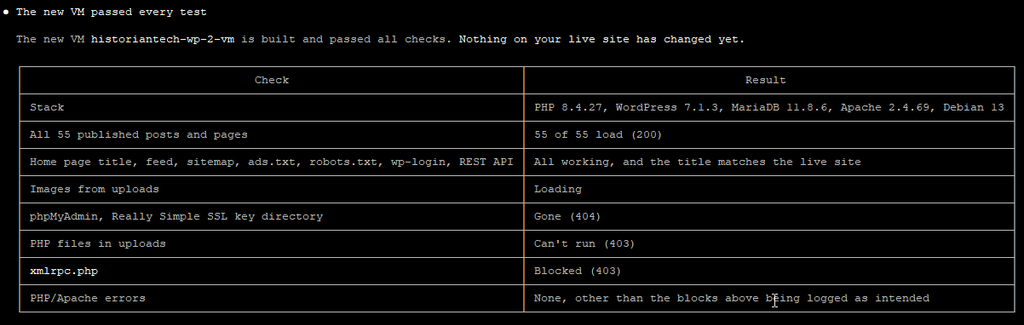
Figure 4. – Screenshot of the test results before cutover
Step 6 – A One-Minute Cutover
Remember the static IP? Because FortiAppSec Cloud sends traffic to that IP, Claude Code simply moved the IP from the old VM to the new one. No DNS changes and no WAF changes were needed. It first put the old site into maintenance mode and synced the database one last time so no comments were lost. The site was down for about a minute.

Figure 5. – Screenshot of the cutover and post-cutover verification
Step 7 – Keep a Way Back
The old VM was stopped, not deleted. Rolling back would mean moving the IP back and starting the old server, which takes a couple of minutes. I asked Claude Code to schedule the final deletion of the old VM and the migration files for three days later. It built in a safety check: if the new site is not healthy at that time, it deletes nothing.
Before and After
| Component | Before | After |
|---|---|---|
| Operating System | Debian 9 (end of life) | Debian 13 |
| PHP | 7.4.28 (end of life, vulnerable) | 8.4.27 (patched for PHP2Shell) |
| Database | MySQL 5.7 (end of life) | MariaDB 11.8 |
| Web Server | Apache 2.4.25 | Apache 2.4.69 |
| Security Updates | None in years | Applied automatically every day |
Important Notes: PHP 8.4.27 is one of the releases that fixes both PHP2Shell vulnerabilities. Debian published it as a security update on October 21, 2026, and its changelog lists both CVEs. The new server had it installed the day after the fix shipped.
The Security Best Practices Now in Place
Patching PHP was the main goal, but Claude Code applied a number of best practices that the old server never had. In plain terms:
- Supported, patched software. Every component is on a currently supported version, including the PHP release that fixes PHP2Shell.
- Automatic security updates. The server installs security updates on its own every day, so I am not relying on my memory again.
- Only the WAF can reach the website. The firewall only accepts web traffic from FortiAppSec Cloud and a short list of trusted addresses, such as my uptime monitoring. Visitors cannot bypass the WAF and hit the server directly.
- No SSH from the internet. Administrative access only works through Google’s Identity-Aware Proxy, which requires my Google account.
- Known-good code only. WordPress, the theme and the plugins were installed fresh and verified against official checksums.
- Less to attack. I left behind 17 inactive plugins, 20 unused themes and the old SSL key folder. If you are not using it, it is only attack surface.
- Uploads cannot run code. Even if someone managed to upload a malicious PHP file, the server refuses to execute anything in the uploads folder.
- XML-RPC blocked. This older WordPress interface is a common brute-force target, and nothing I use needs it.
- No editing code from the dashboard. The built-in WordPress theme and plugin editor is disabled, so a stolen admin login cannot be used to edit PHP files.
- Database locked down. The database only listens on the server itself and uses a new, randomly generated password.
- Real visitor IPs. Previously, every visitor looked like the WAF in my logs. Now the server records the real visitor IP, but only trusts that information when it comes from FortiAppSec Cloud. This also helps the comment spam filters work properly.
- A rollback plan. A snapshot before any change, and the old server kept around until the new one proved itself.
Claude Code also flagged six leftover firewall rules from old test deployments that no longer serve any purpose. Cleaning those up is still on my to-do list, which is a fitting reminder that this kind of housekeeping never really ends.
Where I Stayed in Control
Since this is the part I was most skeptical about, I want to be specific. Claude Code worked quickly, but it did not run off on its own.
- It started with a read-only inventory and changed nothing until it had shown me what it found.
- It asked me to decide anything that cost money or affected the live site: the VM size, what to leave behind and when to cut over.
- It waited for my explicit “cutover now” before touching production.
- It kept a way back at every step: a snapshot first, the old server stopped rather than deleted, and a final cleanup that only runs if the new site is healthy.
In a nutshell, it behaved like a sharp junior engineer who documents everything and asks before doing anything risky. I stayed the one making the decisions.
If You Want to Try This Yourself
You do not need to be a Linux expert to follow the same approach. At a high level:
- Install Claude Code and your cloud provider’s command-line tool, then sign in to your cloud account yourself.
- Ask for a read-only inventory first, and read what comes back. You will probably learn something about your own environment.
- Ask for a plan, and require approval before anything is created, changed or deleted.
- Take a snapshot or backup before any change.
- Rebuild on current software instead of upgrading in place, and move only your content.
- Test the new server before anyone can see it.
- Cut over in a way you can reverse, and delete the old server only after the new one has proven itself.
Pro-Tip: Tell the AI up front which decisions you want to make yourself. Mine asked anyway, but being explicit removes any guesswork.
What I Would Tell You
- A WAF does not replace patching. I knew this, and I still let it slide on my own server. Use both.
- Inventory your “forgotten” servers. Blogs, lab boxes and one-click deployments from years ago are exactly where end-of-life software hides.
- AI is a force multiplier, but you own the approvals. Claude Code turned a weekend project I kept postponing into less than an hour of work. The decisions were still mine, and I would not have it any other way.
If you are sitting on an old server and the PHP2Shell news made your stomach drop a little, I hope this shows that fixing it does not have to be a weekend-long project. As always, please leave a comment below and let me know your thoughts, especially if you have your own “forgotten server” story. I hope this helps!
Until next time.
Claude assisted me in the creation of this blog article.
This article is based on my own environment and is not official Anthropic, Google Cloud or Fortinet guidance. Please check against the current vendor documentation before making changes in production.